Difference between revisions of "Buildings"
| (22 intermediate revisions by 7 users not shown) | |||
| Line 1: | Line 1: | ||
'''Buildings''' in ''[[Foundation]]'' are a necessity to growing the village. When starting a new game, the initial buildings | == Build Menu == | ||
'''Buildings''' in ''[[Foundation]]'' are a necessity to growing the village. When starting a new game, the initial buildings (specifically the [[village center|Village Center]] and [[builder's workshop|Builder's Workshop]]) are forced as they are the only buildings available to construct. After these buildings are completed, the building tree will open up, with [[Quests]] that guide further construction towards specific buildings. | |||
Construction of any building begins by opening the building menu: | Construction of any building begins by opening the building menu: | ||
| Line 14: | Line 15: | ||
Production Filter Icon.png, Resource Production | Production Filter Icon.png, Resource Production | ||
Food Filter Icon.png, Food Production | Food Filter Icon.png, Food Production | ||
Goods Icon.png, | Goods Icon.png, Goods Production | ||
Service Filter Icon.png, Service | Service Filter Icon.png, Service | ||
Administration Filter Icon.png, Administration | Administration Filter Icon.png, Administration | ||
Decoration Filter Icon.png, Decoration | Decoration Filter Icon.png, Common Decoration | ||
Wall Filter Icon.png, Fortification | |||
Wall Filter Icon.png, | |||
Mod Filter Icon.png, Mods}} | Mod Filter Icon.png, Mods}} | ||
==Building Placement== | ==Building Placement== | ||
[[File:Lumber Camp Blueprint.png|200px|thumb|A lumber camp that not yet been placed]] | [[File:Lumber Camp Blueprint.png|200px|thumb|A lumber camp that has not yet been placed]] | ||
Once the building to be placed has been located and selected in the build menu, a blueprint will show in the world under the cursor. The blueprint has 4 key parts: | Once the building to be placed has been located and selected in the build menu, a blueprint will show in the world under the cursor. The blueprint has 4 key parts: | ||
* Building visual - | *Building visual - shows the position and angle of the building when placed. | ||
* Blue line - | *Blue line - the outer boundary. | ||
* | * Small white arrows around the boundary - entry points; blocking these will prevent villagers from entering the building. | ||
* Central arrows - | *Central four-way arrows - click and drag to move the building around the map. | ||
*Circle around central arrows - click and drag to rotate the building. | |||
At the early stages of city building, the rotate and place commands will be all that is required in most situations, alongside right click (or ESC) to cancel/delete the selected part. There are | At the early stages of city building, the rotate and place commands will be all that is required in most situations, alongside right click (or ESC) to cancel/delete the selected part. There are several further controls to be aware of: | ||
* Shift + | *Vertical arrows - allow for resizing of building parts on some modular buildings. | ||
*Left and right arrows (either side of vertical) - allows the player to scroll between different roofing options on some modular buildings. | |||
*Shift + left-click - Allows the building/part to be placed, but retain the blueprint to place again. This allows for the rapid placement of multiple buildings/parts of the same time without having to individually reselect them. | |||
== | ==Resource Bundles== | ||
The construction process uses steps called resource bundles: a package of resources that must be completed in order to construct a specific stage of a building. Many early buildings will have a single bundle of all materials required for construction. | |||
More advanced buildings will have multiple resource bundles in the construction process. Although resources may be brought for any bundle in any order, construction work can only be completed in bundle order. Therefore if the resources for bundle 2 have been collected, but work on bundle 1 has not been completed, construction on bundle 2 cannot begin. Similarly, if resources for bundles 1 and 3 have been collected, but those of bundle 2 have not, then builders can only complete construction on bundle 1. | |||
Where multiple bundles use the same resource, resources brought to the site will be allocated in bundle order. | |||
== | == Buildings and Workers == | ||
After the building is complete, all buildings that perform a function will need workers to be added in order to carry out the building's function. Buildings which only provide passive benefits, such as [[Decorations]], do not need workers. | |||
Mostly, workers can be added to individual buildings on that building's menu. The simplest way is for the player to click the small plus sign on the building menu, which adds the next available unemployed [[Villager]]. If there are [[Villagers]] of multiple [[Rank|Ranks]] available, the plus sign will add the Villager with the most appropriate Rank for the job in question. Alternatively, the player can click the empty worker square on the building menu to view a list of all villagers, and choose the one they want to add to the building. | |||
The Monastery is unique in this respect, in that players cannot assign workers to individual jobs within the Monastery. Instead, the player devotes Villagers to the Monastery as a whole, and game algorithms decide which job the new Novice should do within the Monastery. This mirrors the reality of medieval life, where secular lords had relatively little control over the inner workings of Monasteries. | |||
== | == Individual Buildings == | ||
Most buildings in the game are individual buildings, which consist of only one part. They cannot be personalised in their design, and cannot be extended, improved or decorated. Many (but not all) early buildings, such as the [[Stonecutter Camp]] and the [[Sawmill]], are in this category. | |||
=== Add-ons === | |||
In some buildings, there is a main part similar to the above, which is where the function of the building takes place, but additional parts can be added to the building, typically to improve its storage or worker capacity, or to decorate it. These add-on parts cannot function without the main part of the building. Examples of buildings with add-ons are the [[Wheat Farm]], [[Stonemason Hut]] and [[Common Wares Workshop]]. | |||
== Modular Buildings == | |||
Modular buildings are buildings are highly adaptable buildings that can be extended as the village expands, to add more functions, extend capacity, or for aesthetics. | |||
The first two modular buildings are the Builder's Workshop (which can be extended with a [[Sculpture Workshop]] and a [[Stained Glass Workshop]]) and the [[Market]] (which can be extended with different types of Market Stall to meet different [[Needs]]). Large administrative buildings such as [[Church|churches]], [[Tavern|Taverns]], the [[Manor House]], the [[Monastery]] and the [[Keep]] are also modular; the player has a number of aesthetic options to choose from when building these buildings, and can add a number of sub-buildings, which allow sections of the same building to perform different functions. All modular buildings have one or more mandatory requirements that will prevent the building from functioning properly if not met. For instance, the [[Rustic Church]] must have a door, core building and bell tower in order to work properly. There are indicators on the building's menu during construction which show whether the mandatory requirements have been met. | |||
[[ | |||
== | === Sub-buildings === | ||
Some large modular buildings, known as Monuments ([[Tavern|Taverns]], [[Manor House|Manor Houses]], [[Monastery|Monasteries]] and [[Keep|Keeps]]) can contain sub-buildings which allow the same building to carry out multiple functions. For example, in the Manor House players can build a Great Hall, [[Tax Office|Tax Offices]], a [[Bailiff's Office]], [[Watchpost|Watchposts]], and [[Treasury|Treasuries]]. Players can also build Free Build sub-buildings in any of these buildings, which allow the player to add building parts for aesthetic reasons, without making any change to the capacity of functions of the building. | |||
A new sub-building can be added at the bottom left of the building's build menu, where the player can also see a list of existing sub-buildings. Using the cog button next to each sub-building, the player also has the option of switching the function of that sub-building, which essentially changes it to a different sub-building. In some cases, some parts of the sub-building may be deleted as part of the change, if that sub-building uses unique building parts. For example, the [[Castle]] sub-building in the [[Keep]] uses some unique main building parts, which will be deleted if the player changes the function from Castle to, for example, [[Barracks]]. <gallery> | |||
Modular Building Overview.png|Overview of a Market with multiple pieces installed. | |||
Resize Example.png|A church core selected showing the resize indicator in the middle of the part. | |||
</gallery> | |||
==Decorations== | |||
{{Main|Decorations}} | |||
Decorations are standalone objects that improve the [[Beautification]] level of the area in which they are placed, and contribute to the overall [[Prosperity]] of the city. If built as part of [[Monument|Monuments]], they instead provide [[Splendour]] matching the Monument's type. For example, if decorations are built as part of the Manor House, they will provide additional [[Labour Splendour]]. | |||
== Maintenance Costs == | |||
[[File:Maintenance Cost.png|frameless|right|100px]] | |||
All buildings have a monthly maintenance cost. If maintenance costs exceed income, the treasury may start to run out of [[Gold Coins|gold]], which in turn will prevent the placement of new buildings, the importing of resources and the purchase of new [[territories]]. | |||
==Buildings Summary== | == Buildings Summary == | ||
{{Building | {{Building oTable}} | ||
[[Category:Game Mechanics]] | [[Category:Game Mechanics]] | ||
Latest revision as of 12:58, 6 February 2026
Build Menu
Buildings in Foundation are a necessity to growing the village. When starting a new game, the initial buildings (specifically the Village Center and Builder's Workshop) are forced as they are the only buildings available to construct. After these buildings are completed, the building tree will open up, with Quests that guide further construction towards specific buildings.
Construction of any building begins by opening the building menu:

Inactive Icon
Hover Icon

Selected Icon


From the menu, there are two methods of finding the desired building: the Search box in the top right, or the building type filters at the bottom of the menu.
 - All
- All - Logistics
 - Resource Production
 - Food Production
 - Goods Production
 - Service
 - Administration
 - Common Decoration
 - Fortification
 - Mods
Building Placement

Once the building to be placed has been located and selected in the build menu, a blueprint will show in the world under the cursor. The blueprint has 4 key parts:
- Building visual - shows the position and angle of the building when placed.
- Blue line - the outer boundary.
- Small white arrows around the boundary - entry points; blocking these will prevent villagers from entering the building.
- Central four-way arrows - click and drag to move the building around the map.
- Circle around central arrows - click and drag to rotate the building.
At the early stages of city building, the rotate and place commands will be all that is required in most situations, alongside right click (or ESC) to cancel/delete the selected part. There are several further controls to be aware of:
- Vertical arrows - allow for resizing of building parts on some modular buildings.
- Left and right arrows (either side of vertical) - allows the player to scroll between different roofing options on some modular buildings.
- Shift + left-click - Allows the building/part to be placed, but retain the blueprint to place again. This allows for the rapid placement of multiple buildings/parts of the same time without having to individually reselect them.
Resource Bundles
The construction process uses steps called resource bundles: a package of resources that must be completed in order to construct a specific stage of a building. Many early buildings will have a single bundle of all materials required for construction.
More advanced buildings will have multiple resource bundles in the construction process. Although resources may be brought for any bundle in any order, construction work can only be completed in bundle order. Therefore if the resources for bundle 2 have been collected, but work on bundle 1 has not been completed, construction on bundle 2 cannot begin. Similarly, if resources for bundles 1 and 3 have been collected, but those of bundle 2 have not, then builders can only complete construction on bundle 1.
Where multiple bundles use the same resource, resources brought to the site will be allocated in bundle order.
Buildings and Workers
After the building is complete, all buildings that perform a function will need workers to be added in order to carry out the building's function. Buildings which only provide passive benefits, such as Decorations, do not need workers.
Mostly, workers can be added to individual buildings on that building's menu. The simplest way is for the player to click the small plus sign on the building menu, which adds the next available unemployed Villager. If there are Villagers of multiple Ranks available, the plus sign will add the Villager with the most appropriate Rank for the job in question. Alternatively, the player can click the empty worker square on the building menu to view a list of all villagers, and choose the one they want to add to the building.
The Monastery is unique in this respect, in that players cannot assign workers to individual jobs within the Monastery. Instead, the player devotes Villagers to the Monastery as a whole, and game algorithms decide which job the new Novice should do within the Monastery. This mirrors the reality of medieval life, where secular lords had relatively little control over the inner workings of Monasteries.
Individual Buildings
Most buildings in the game are individual buildings, which consist of only one part. They cannot be personalised in their design, and cannot be extended, improved or decorated. Many (but not all) early buildings, such as the Stonecutter Camp and the Sawmill, are in this category.
Add-ons
In some buildings, there is a main part similar to the above, which is where the function of the building takes place, but additional parts can be added to the building, typically to improve its storage or worker capacity, or to decorate it. These add-on parts cannot function without the main part of the building. Examples of buildings with add-ons are the Wheat Farm, Stonemason Hut and Common Wares Workshop.
Modular Buildings
Modular buildings are buildings are highly adaptable buildings that can be extended as the village expands, to add more functions, extend capacity, or for aesthetics.
The first two modular buildings are the Builder's Workshop (which can be extended with a Sculpture Workshop and a Stained Glass Workshop) and the Market (which can be extended with different types of Market Stall to meet different Needs). Large administrative buildings such as churches, Taverns, the Manor House, the Monastery and the Keep are also modular; the player has a number of aesthetic options to choose from when building these buildings, and can add a number of sub-buildings, which allow sections of the same building to perform different functions. All modular buildings have one or more mandatory requirements that will prevent the building from functioning properly if not met. For instance, the Rustic Church must have a door, core building and bell tower in order to work properly. There are indicators on the building's menu during construction which show whether the mandatory requirements have been met.
Sub-buildings
Some large modular buildings, known as Monuments (Taverns, Manor Houses, Monasteries and Keeps) can contain sub-buildings which allow the same building to carry out multiple functions. For example, in the Manor House players can build a Great Hall, Tax Offices, a Bailiff's Office, Watchposts, and Treasuries. Players can also build Free Build sub-buildings in any of these buildings, which allow the player to add building parts for aesthetic reasons, without making any change to the capacity of functions of the building.
A new sub-building can be added at the bottom left of the building's build menu, where the player can also see a list of existing sub-buildings. Using the cog button next to each sub-building, the player also has the option of switching the function of that sub-building, which essentially changes it to a different sub-building. In some cases, some parts of the sub-building may be deleted as part of the change, if that sub-building uses unique building parts. For example, the Castle sub-building in the Keep uses some unique main building parts, which will be deleted if the player changes the function from Castle to, for example, Barracks.
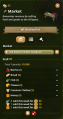
Overview of a Market with multiple pieces installed.
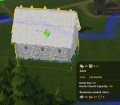
A church core selected showing the resize indicator in the middle of the part.


Decorations
Main Article: Decorations
Decorations are standalone objects that improve the Beautification level of the area in which they are placed, and contribute to the overall Prosperity of the city. If built as part of Monuments, they instead provide Splendour matching the Monument's type. For example, if decorations are built as part of the Manor House, they will provide additional Labour Splendour.
Maintenance Costs

All buildings have a monthly maintenance cost. If maintenance costs exceed income, the treasury may start to run out of gold, which in turn will prevent the placement of new buildings, the importing of resources and the purchase of new territories.


